

The System Your Business Outgrew Is Not Failing. It Was Never Designed for This Stage.
“The system is fine. It is just not keeping up.”
That sentence usually marks the beginning of a migration decision. Not a crisis, not a failure. Just a growing awareness that the tool which served the business through ₹5 crore revenue is now slowing it down at ₹30 crore.
In Indian SMEs and mid-market companies, legacy systems come in many forms: Tally, Busy, SAP Business One, a custom-built software from 2009, or, most commonly, a combination of all of the above held together by Excel sheets and WhatsApp threads.
None of those systems failed. They did their job. The business grew beyond them.
The question is no longer whether to migrate. The question is how to migrate without burning the business down while doing it.
This is that guide.
The Real Reason ERP Migration Gets Postponed Every Quarter
In almost every conversation with an Indian founder or CFO who has been “considering” moving to a modern ERP for 18 months, the same three fears emerge.
The first is the data fear. Seven years of transactions sit in Tally. Customer masters, vendor ledgers, opening balances, GST returns. All of it inside one system that the team knows inside out. The idea of touching that feels reckless.
The second is the disruption fear. The business cannot afford to go dark for two weeks. There are orders to fulfil, invoices to raise, salaries to process. The fear is that a migration will pause operations right when they should be running.
The third is the people fear. The accountant who has been managing Tally for eight years is already sceptical. The warehouse team is not particularly comfortable with software in any form. Training feels like a cost that will never fully pay off.
Each of these fears is legitimate. None of them are reasons to stay on a system that is visibly costing the business. In reconciliation time, reporting delays, and decisions made with information that is two weeks old.
The risk of migrating with a plan is lower than the risk of not migrating at all. The first costs time and money once. The second costs time and money every single month.
What postponement really means, in practice, is this: the team continues spending 15% of their operational hours reconciling data across systems that do not talk to each other. The founder continues making capital allocation decisions without a consolidated view of the business. And the cost of eventual migration, which will happen, grows with every additional year of unclean data.
You Are Not Just Moving Data. You Are Moving How Your Business Thinks.
Most ERP migration guides treat the problem as a technical one. Export the data, map the fields, import into the new system, go live. That framing explains why so many migrations technically succeed and operationally fail.
There are three layers to any ERP migration. Most guides address only the first.
Data migration is the visible layer: master records, opening balances, transaction history. This is the part that consultants put in their project plans and clients worry about most. It is also the most solvable part.
Process migration is the invisible layer. Who approves what. What triggers a purchase order. How a sales order moves from confirmed to invoiced to collected. What happens when goods are received with a shortage. In most Indian SMEs, these processes are not documented anywhere. They exist in the heads of three people. If the new ERP is configured without surfacing them first, the team will work around it within a month.
Habit migration is the hardest layer. This is not about processes on paper. It is about the intuitive, daily behaviour of the people running the business. The accountant who opens Tally first thing every morning. The store manager who counts physical stock because “the system is usually wrong.” The sales executive who updates his own Excel because the CRM is too slow.
A migration that addresses only data and ignores process and habit will produce a shiny new ERP that the team quietly bypasses.
At ochre.digital, we treat ERP migration as a business redesign exercise with a technology output, not the other way around. Odoo is the result of getting the process design right, not the starting point.
The 7-Step Odoo Migration Framework for Indian Businesses
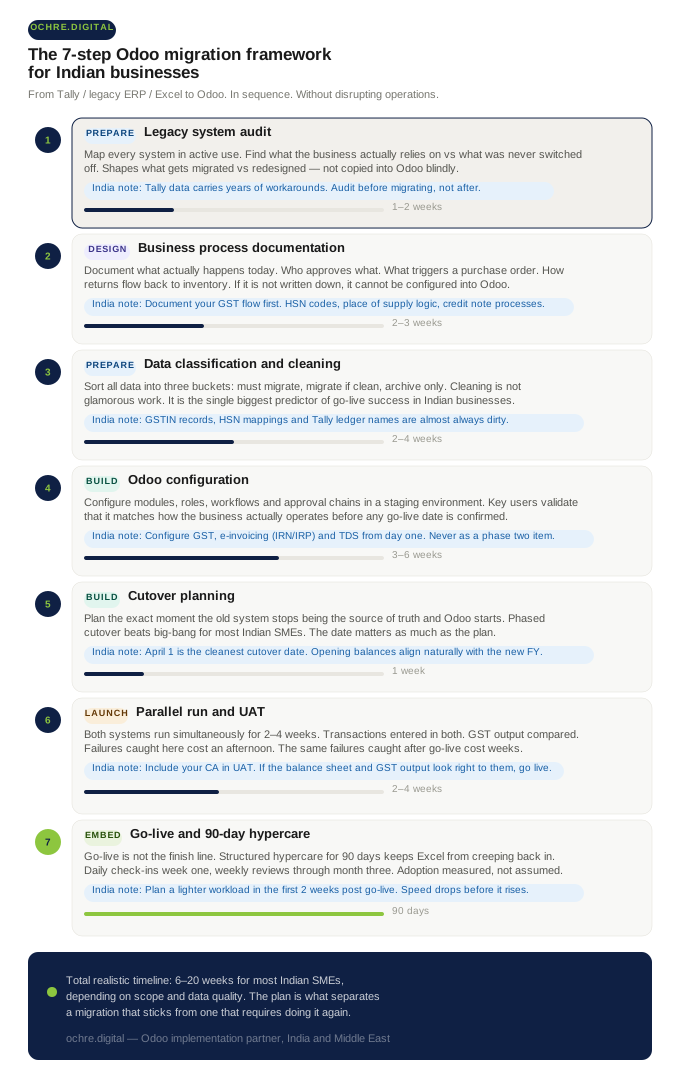
The following framework reflects what actually works across manufacturing, trading, distribution, and service businesses in India. It is not the fastest path. It is the one that does not require doing the project twice.
STEP 1
Legacy System Audit: What You Have, and What You Actually Use
Before anything else, map every system in active use: Tally, the custom ERP, the logistics portal, the Excel inventory tracker, the WhatsApp order confirmation thread. Then ask a harder question: what percentage of each system’s capability is actually being used?
Most Indian businesses, when they audit honestly, discover they are using roughly 40% of their legacy system’s actual features. The rest exists because nobody turned it off, or because it was configured years ago for a workflow that no longer exists.
This audit shapes what needs to be migrated versus what needs to be redesigned. You are not recreating the old system in Odoo. You are building what the business needs now, and the audit tells you the difference.
“India note: Tally data often carries years of workarounds: ledger names that were shortcuts, groups that were never cleaned, entries that were corrected with contra entries instead of proper reversals. Audit before migrating, not after. Migrating dirty data into a clean system produces a dirty system.
STEP 2
Business Process Documentation: The Step Most Clients Want to Skip
This is the step that generates the most resistance and delivers the most value. Before any Odoo configuration begins, document what actually happens today, not what the process is supposed to be, but what the team actually does.
How does a purchase request become a purchase order? Who has authority to approve above ₹50,000? When goods arrive short, who decides whether to accept or reject? How does a sales return flow back into inventory and accounting?
In most Indian SMEs, the honest answer to all of these questions is: “It depends on who is available.” That is not a process. That is a relationship. And relationships do not configure into ERP systems.
Process documentation is also where the business gets to decide what it wants to change, not just replicate. A migration is the one moment where it is easier to redesign a broken process than at any other time. That window closes after go-live.
“India note: Document your GST flow explicitly before any configuration begins. HSN codes, place of supply logic, credit note processes, e-invoicing triggers. This is the single biggest source of post-migration accounting errors in Indian businesses. It cannot be patched after go-live.
STEP 3
Data Classification and Cleaning
Not all data migrates. And not all data should.
The practical approach is to classify into three buckets. The first is data that must migrate: open sales orders, open purchase orders, active customer and vendor masters, item masters with current pricing, outstanding receivables and payables, and opening account balances. The second is data that migrates if it is clean: completed transaction history for the past 12 to 24 months. The third is data that is archived but not migrated: old transactions that are needed for reference but not for daily operations.
Data cleaning is not glamorous work. It is also the single biggest predictor of go-live success. Expect two to four weeks of dedicated effort for an average Indian SME. That estimate nearly always surprises clients. It consistently surprises them less than a go-live on dirty data does.
“India note: Three specific problem areas in Indian business data deserve dedicated cleaning time. Tally ledger names that are informal abbreviations or founder nicknames. Customer GSTIN records that were entered incorrectly or have never been verified. Item master HSN mappings that were applied loosely or inconsistently. All three create compliance exposure if migrated unchecked.
STEP 4
Odoo Configuration: Modules, Roles, Workflows
This is where Odoo is actually built, not to replicate the old system, but to implement the redesigned processes documented in Step 2.
Configuration includes module selection and sequencing (which to implement first, which to phase in later), user roles and access controls (who sees what, who can approve what), approval workflows, reporting structure, and, for Indian businesses, full GST and TDS configuration.
Configuration should always happen in a staging environment. Key users should work in the staging system and validate that it matches how the business actually operates before any go-live date is confirmed. A demo is not validation. A demo is a presentation. Validation is when the accounts team enters a month of transactions and checks the GST output.
This step is also where the question of customisation is answered. Not every gap between Odoo’s standard functionality and the business’s requirements needs custom development. Many gaps exist because the process design in Step 2 was not complete. Revisit the process before writing custom code.
“India note: Configure Indian localisation from day one, not as a phase two afterthought. This means GST tax groups, e-invoicing (IRN/IRP) configuration, TDS applicability rules, and multi-state operations if the business operates across state lines. These are structural, not cosmetic. Adding them after launch is expensive and error-prone.
STEP 5
Migration Cutover Planning
The cutover is the moment when the old system stops being the source of truth and Odoo starts. This moment needs deliberate planning. Not just a technical plan for how data moves, but a business calendar plan for when it happens.
For most Indian businesses, a phased cutover is significantly lower risk than a big-bang approach. This means going live on accounting first, then inventory, then manufacturing or project management. Each phase stabilises before the next one starts. The team builds confidence progressively instead of absorbing everything at once.
A big-bang cutover (everything live on day one) works only when scope is genuinely limited and the team has done extensive testing. For a multi-department Indian SME, it is the highest-risk approach and the one most frequently chosen because it sounds faster.
“India note: April 1, the start of the Indian financial year, is the single cleanest cutover date for accounting migration. Opening balances align naturally with the new FY, GST reconciliation starts fresh, and there is no mid-year complexity to manage. If your timeline allows it, plan toward this date. If not, the next best window is after a GST return filing cycle closes.
STEP 6
Parallel Run and User Acceptance Testing
For two to four weeks before the hard cutover, both systems run simultaneously. Transactions are entered in both the legacy system and Odoo. Outputs are compared. Discrepancies are investigated and resolved before the old system is switched off.
User acceptance testing (UAT) is where the team formally confirms that Odoo produces the correct outputs for the business. GST returns match. Inventory values reconcile. Profit and loss is readable. Reports reflect what the business actually needs to see.
UAT is not a formality. It is the final checkpoint before the business depends on the new system entirely. Failures caught in UAT cost an afternoon to fix. The same failures caught after go-live cost weeks, and sometimes financial exposure.
The most common UAT finding in Indian businesses is that reports are technically correct but operationally unfamiliar. The data is right; the format is not how the team is used to reading it. This is a training issue, not a system issue, and it is far easier to address before go-live than after.
“India note: Involve your CA or statutory auditor in UAT, even for half a day. If the balance sheet structure, GST output, and TDS deduction logic look right to them, the system is configured correctly. If they raise a concern, you want to know before the first live invoice goes out.”
STEP 7
Go-Live, Hypercare, and the 90-Day Stabilisation Window
Go-live is not the finish line. It is the start of a different kind of work.
The first 90 days after go-live, the hypercare period, determine whether the migration becomes permanent or gradually unravels. During this window, the team encounters real transactions that the staging environment did not cover. Edge cases surface. Process gaps appear. Users revert to old habits under pressure.
Structured hypercare means daily check-ins with key users in the first two weeks, a clear channel for reporting issues and getting them resolved same-day, weekly progress reviews against adoption metrics, and a named person on the partner side who is accountable for stability.
Businesses that skip structured hypercare, because the project technically concluded at go-live, consistently see the same pattern: Excel creeps back in by day 45. By day 90, two parallel systems are running again, and the team has lost trust in the new one.
“India note: Operationally, plan for a lighter workload in the first two weeks post go-live. Speed drops before it rises. Teams that budget for this, by avoiding major launches, shipment peaks, or audit periods during the stabilisation window, recover significantly faster than those who go live in the middle of a busy cycle.
Four Migration Risks Specific to Indian Businesses That Most Guides Do Not Mention
Generic ERP migration content is written for a global audience. The risks below are specific to how Indian businesses operate: legally, operationally, and culturally.
GST data integrity across the migration boundary. Legacy systems often carry inconsistent GSTIN records, uncleaned HSN mappings, and years of manual GST adjustments that do not translate cleanly into a structured system. If migrated without a deliberate cleaning exercise, these produce mismatches in GSTR-1 versus GSTR-2A reconciliation immediately after go-live. This means your CA is cleaning up ERP migration errors during the same period they are trying to learn the new system.
Tally-to-Odoo chart of accounts remapping. Tally’s ledger and group structure does not map one-to-one to Odoo’s account types. A direct data dump produces a chart of accounts that confuses both the ERP and the statutory auditor. A deliberate remapping exercise, typically three to five days with the finance lead and the partner, is required. It is not optional, and it cannot be done after the fact without re-entering data.
Multi-state IGST and place-of-supply complexity. Businesses operating across state lines have place-of-supply logic embedded in every transaction. This must be configured in Odoo correctly before the first live invoice, not discovered after the first compliance notice. The configuration is structural, not a setting. It affects how tax groups are built, how invoice templates are designed, and how the GST return is populated.
Team resistance in Indian family businesses and closely-held SMEs. In many Indian companies, Tally is managed by one trusted accountant who has been with the organisation for a decade or more. The ERP migration is, in their experience, a displacement of their expertise, their institutional memory, and their status as the person who knows where everything is. Addressing this directly, through involvement rather than imposition, is the single most important change management action available to the leadership. The person who feels ownership over the new system will protect it. The person who felt bypassed will undermine it, often without intending to.
How Long Does Odoo Migration Actually Take? (Honest Numbers for Indian SMEs)
| Business type | Scope | Realistic timeline |
|---|---|---|
| Small SME | Finance + Inventory, single location, 10–20 users | 6–10 weeks |
| Mid-market SME | Multi-department, manufacturing or trading, 20–60 users | 12–20 weeks |
| Complex / multi-entity | Multi-company, multi-state, integrations, 60+ users | 20–36 weeks |
What extends timelines in practice: delayed data cleaning (the most common), incomplete process documentation at the start of the project, scope changes after configuration has begun, unavailability of key users for testing, and decision-making bottlenecks at the leadership level when configurations require a business call.
If your implementation partner quotes three weeks for a full ERP migration of a 50-person business, ask them specifically which of the seven steps they are skipping. The answer will tell you exactly where the risk has been transferred from the project timeline to the post-go-live period, which you will pay for without a structured plan to contain it.
For detailed cost ranges by scope and department combination, see our Odoo implementation pricing guide for India. This article focuses on time and process; that guide covers the financial structure of an ERP investment.
Frequently Asked Questions on Odoo ERP Migration in India
Can I migrate from Tally to Odoo without losing historical data?
Yes, but the answer depends on how clean your Tally data is. Opening balances, active masters, and recent transactions migrate cleanly when the data is well-maintained. Old historical transactions are typically archived rather than live-migrated, and accessed via Tally if a reference is ever needed. A full historical migration of many years of Tally data is possible but adds time and cost, and is rarely necessary for daily operations. Most businesses are better served by a clean opening balance migration with historical data available on request.
What is the best time to cut over to Odoo in India?
April 1, the start of the Indian financial year, is the most common and cleanest cutover date for accounting migration. Opening balances align naturally with the new financial year, GST reconciliation starts fresh, and there is no mid-year complexity to manage. If your project timeline does not allow an April cutover, the next best window is immediately after a GST return filing cycle closes, when the legacy system’s compliance obligations are settled for that period.
How do I migrate GST data from my old ERP to Odoo?
GST data migration is not a single step. It is a sequence. Clean and verify GSTIN records for all customers and vendors. Remap HSN codes to the correct tax rates in Odoo. Configure place-of-supply rules for inter-state and intra-state transactions. Set up e-invoicing (IRN/IRP) if applicable. Validate the GST output in the staging environment before the first live transaction. None of this is automated. It requires deliberate configuration by a consultant with Indian compliance experience.
Do I need to stop operations during ERP migration?
No. A well-planned migration uses a parallel run approach where both systems run simultaneously for two to four weeks before cutover. Operations continue on the legacy system while Odoo is being validated. The hard cutover happens only after the team has confidence in the new system’s outputs. The only period of genuine disruption is the first two weeks post go-live, when speed drops as the team adjusts to new workflows. This is normal, expected, and temporary.
How is migrating from SAP Business One to Odoo different from migrating from Tally?
SAP B1 migrations typically involve cleaner, more structured data: better master records, more consistent transaction history, documented processes. The data cleaning phase is shorter. However, SAP B1’s manufacturing, inventory, and financial structure does not map directly to Odoo’s. More time is spent in process remapping and Odoo configuration compared to a Tally migration. The total project timeline is often similar, but the effort distribution is different: less cleaning, more redesign.
What happens to my Tally data after migration? Do I need to keep Tally running?
After migration, most Indian businesses keep their Tally installation accessible in read-only mode for a period of 12 to 24 months. This provides a reference for historical transactions, old GST returns, and any auditor queries that require pre-migration records. Tally does not need to be actively used or maintained. It is simply available as an archive. After that period, the majority of businesses decommission it entirely.
Migration Is Not the Risk. Staying Is.
Every business that has successfully migrated to Odoo will describe the same experience. The first 30 days were harder than expected. The next 12 months were worth every hour of the difficulty.
The businesses that postpone indefinitely do not avoid the pain. They pay it monthly: in reconciliation time that should be decision time, in reports that are assembled rather than generated, and in operational questions that cannot be answered without calling three people.
Migration done with a plan is not a disruption. It is a controlled transition from where the business is to where it needs to be. The plan is what separates a migration that sticks from one that becomes a cautionary story.
At ochre.digital, we have guided manufacturers, distributors, trading companies, construction firms, and service businesses through this transition, in India and across the Middle East. Our approach is consistent: redesign the process first, configure the system second, go live third. The technology is the output of getting the business design right.
Thinking about migrating your ERP to Odoo?
After understanding your current system, your data, and your operational requirements, we will come back with a migration approach specific to your business, not a generic project plan. Book a 30-minute strategy session with the ochre.digital team. We do not start with a demo. We start with your situation.